WAPIdesk
The Ultimate AI WhatsApp Receptionist, Live Chat & Omnichannel SaaS Platform.
WAPIdesk is a pro-grade multi-tenant SaaS application built on the modern Laravel 10 framework. It empowers business owners, agencies, clinics, e-commerce stores, and service providers to deploy autonomous 24/7 AI Receptionists across WhatsApp and embedded web widgets.
With a multi-LLM AI architecture (OpenAI GPT-4o, Google Gemini 1.5, Groq Llama 3), dual WhatsApp connectivity (Meta Cloud API & UltraMsg QR-Gateway), automated appointment scheduling, in-chat payments (17+ payment gateways), document RAG training (PDF/Word/TXT), embeddable web chat widgets, product catalogs, dynamic WhatsApp forms, click-to-ads attribution, and mass broadcast campaigns, WAPIdesk is designed to deliver immediate return on investment for SaaS platform owners.
Core Features & CodeCanyon Standout Highlights
-
Super Admin SaaS Revenue Engine: Launch your own high-ticket SaaS business. Charge tenants monthly or yearly subscription fees with custom tier feature flags, broadcast limits, and payment gateway controls.
-
Dual WhatsApp Gateway Architecture: Full support for both Meta Official Cloud API (Phone Number ID & Permanent Access Tokens) and UltraMsg QR-Code Gateway for instant device pairing.
-
Multi-LLM AI Engine: Powered by OpenAI (GPT-4o / GPT-4o-mini), Google Gemini 1.5 Pro/Flash, and Groq Llama 3 with automatic tool calling and custom prompt instructions.
-
RAG Document Training & Knowledge Base: Upload PDF documents, Word files (DOCX), or plain text files. The AI extracts knowledge and answers customer inquiries with precision.
-
WhatsApp Product Catalog Engine: Manage physical items, price lists, images, and in-stock statuses. The AI automatically presents catalog items and recommends products to WhatsApp shoppers.
-
WhatsApp Forms & Dynamic Surveys: Create custom forms with public URLs. The AI automatically detects when a customer needs to fill out an intake form, survey, or feedback sheet and shares the direct link in-chat.
-
Autonomous AI Appointment Booking: Performs real-time conflict checking, creates bookings, handles reschedules, cancels appointments, and sends automated notifications to tenants.
-
In-Chat WhatsApp Payment Links: Generates dynamic checkout links directly inside WhatsApp chats using 17+ integrated payment gateways (Stripe, PayPal, Paystack, Flutterwave, CoinOS, NOWPayments, Razorpay, etc.).
-
Tenant Public Business Landing Page: Every business gets a beautiful, dedicated public storefront page (`/b/your-business-slug`) with direct booking, catalog showcases, and business contact cards.
-
Coupon & Discount Engine: Create promotional coupon codes with percentage or fixed discounts, usage limits, and expiration dates for subscription upgrades.
-
Embeddable Web Chat Widget: Pure Vanilla JavaScript widget with zero external dependencies. Embed on any website with domain whitelisting, custom colors, title, greeting, and optional WhatsApp quick-chat.
-
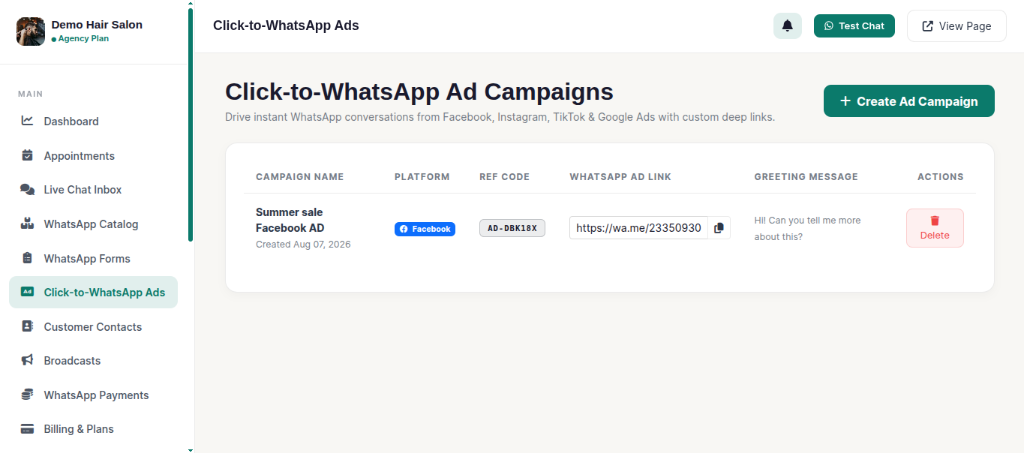
Click-to-WhatsApp Ad Campaigns: Generate custom deep links with reference codes for Facebook, Instagram, TikTok, and Google Ads to track ad lead conversions automatically.
-
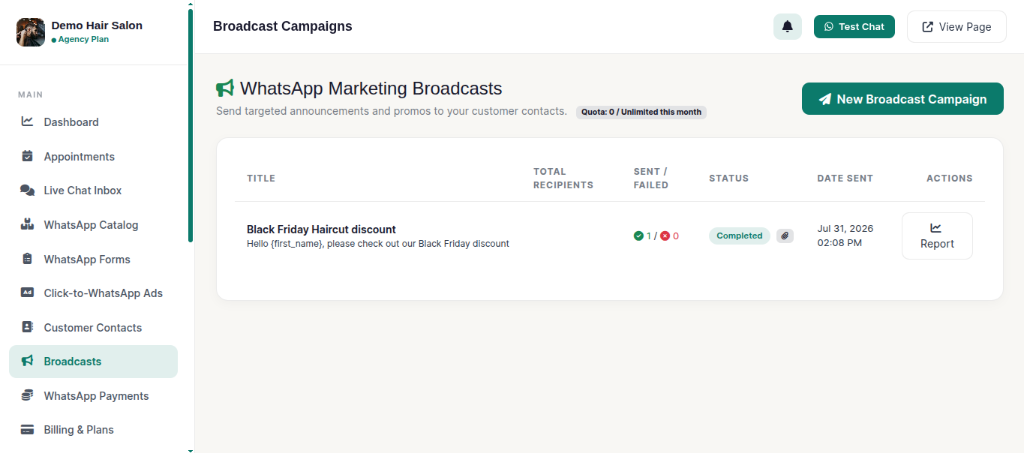
Mass WhatsApp Broadcast Engine: Dispatch bulk broadcast campaigns to customer lists with batch size limits, delay intervals, media attachments (images/documents), and live progress tracking.
-
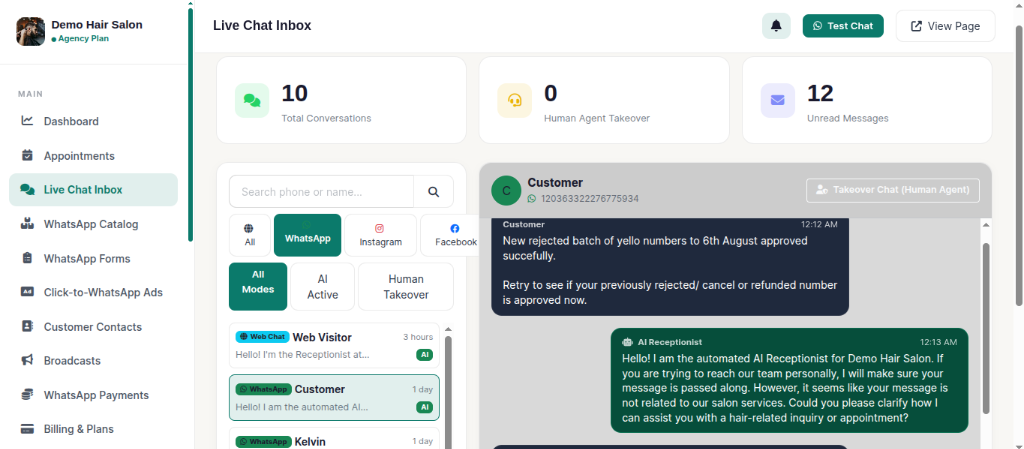
Live Chat & Human Agent Override: Real-time live chat inbox allowing human support agents to seamlessly pause the AI and take over conversations with desktop audio alerts.
-
3 Curated Modern Dashboard Themes: Switch seamlessly between Dark Emerald, Light Ivory, and Midnight Purple.
System Requirements
WAPIdesk is designed to run efficiently on standard shared hosting servers (cPanel/Plesk) as well as VPS and Cloud instances (Ubuntu/Nginx/Apache).
Server Specifications
- PHP Version: PHP 8.2 or PHP 8.3
- Database: MySQL 8.0+ or MariaDB 10.4+
- Web Server: Apache with mod_rewrite enabled or Nginx
Required PHP Extensions
BCMath,Ctype,cURLDOM,Fileinfo,JSONMbstring,OpenSSL,PDOTokenizer,XML,Zip
Folder Structure
Upon extracting the package zip, you will find the following organized directory layout:
Application Package Layout
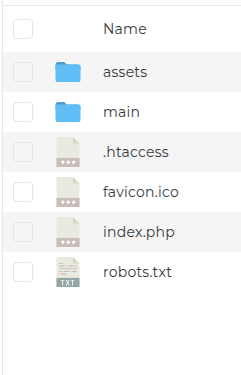
WAPIdesk-v2.0/
├── assets/                 # Shared public asset files (CSS, JS, Logos, Uploads)
├── main/                   # Core Laravel 10 application source files
│   ├── app/                # Controllers, Models, Services, Jobs, Mailables
│   ├── bootstrap/          # Framework bootstrap files
│   ├── config/             # Configuration files (database, app, cors, etc.)
│   ├── database/           # Migrations, Seeders, SQL exports (install.sql / database.sql)
│   ├── public/             # Entry directory assets
│   ├── resources/          # Blade views (Admin, Tenant, Frontend)
│   ├── routes/             # Web, Admin, Tenant, API, Channels routes
│   ├── storage/            # Application logs, caches, sessions
│   └── .env                # Environment configuration file
├── Documentation/          # Official HTML Documentation (This guide)
├── database.sql            # Ready-to-import complete database export
├── index.php               # Root entry file for shared hosting
└── .htaccess               # Apache web server routing rules
How To Install
Follow these step-by-step instructions to deploy WAPIdesk on shared hosting (cPanel) or a VPS server:
1. Upload Code
Upload the package zip file to your web server root directory (e.g. public_html or domain document root).
2. Extract Code
Once uploaded, extract the contents of the zip file and relocate all contents from the Files directory to the designated main folder for installation. Ensure that both the index.php and .htaccess files are also relocated to the appropriate root.
3. Create MySQL Database
Log in to your hosting control panel (cPanel / Plesk), navigate to MySQL Databases, create a new database, create a database user, and assign full privileges to the user.
4. Import Database SQL
Open phpMyAdmin, select your database, click Import, select the database.sql file included in the root folder, and click Go to populate all tables.
5. Configure .env File
Open the main/.env file using your code editor or cPanel File Manager and update your site URL and database credentials:
APP_NAME=WAPIdesk
APP_ENV=production
APP_URL=https://your-domain.com

DB_CONNECTION=mysql
DB_HOST=127.0.0.1
DB_PORT=3306
DB_DATABASE=your_database_name
DB_USERNAME=your_database_user
DB_PASSWORD=your_database_password
6. Set Directory Permissions
Ensure that the main/storage and main/bootstrap/cache folders have write permissions (CHMOD 775 or 755).
Super Admin Login URL:
https://your-domain.com/admin/loginDefault Admin Email:
admin@wapidesk.comDefault Admin Password:
admin123Remember to change the default admin credentials immediately after logging in under Admin Profile Settings!
Cron Job Setup
WAPIdesk relies on automated background processes for critical features such as scheduled WhatsApp reminders, mass broadcast dispatches, queue job processing, and system maintenance.
CRITICAL REQUIREMENT: Mandatory Server Cron Job
Without configuring the Cron Job, automated WhatsApp broadcast campaigns, appointment reminders, and background queue workers WILL NOT FUNCTION.
Set the frequency to * * * * * (Once Per Minute) on all web hosting control panels.
1. Command — cPanel Hosting
Add the following command to run every minute (* * * * *) in your cPanel Cron Jobs menu:
/usr/local/bin/php /home/username/public_html/main/artisan schedule:run >> /dev/null 2>&1
Note: Uses the full PHP binary path — required for cPanel's restricted cron environment. Replace /home/username/public_html/main with your actual site root path.
2. Command — DirectAdmin / SSH / VPS
In DirectAdmin under Advanced Features → Cronjobs (or VPS crontab), set frequency to * * * * * and enter:
cd "/home/username/public_html/main" && php artisan schedule:run >> /dev/null 2>&1
Note: Standard command format for DirectAdmin, VPS, and SSH environments starting with cd into your application directory.
3. Queue Worker Cron (Shared Hosting Fix)
On shared hosting without Supervisor daemon, add a second cron job to run every 5 minutes (*/5 * * * *) to process queued webhooks and broadcast emails:
cd "/home/username/public_html/main" && php artisan queue:work --stop-when-empty >> /dev/null 2>&1
Super Admin SaaS Monetization & Revenue Engine
As the platform owner (Super Admin), WAPIdesk gives you total control over how you monetize your SaaS business:
Recurring Subscription Tiers
Offer monthly and yearly plans (e.g., Starter, Professional, Enterprise) with automated billing via 17+ payment gateways.
Granular Feature Controls
Control exactly which features each plan tier can access: WhatsApp Broadcasts, Web Chat Widget, Knowledge Base RAG, WhatsApp Payments, or Click-to-Ads.
Quota Limits & Usage Rules
Set strict monthly limits per subscription plan for broadcast campaign dispatches, knowledge base file uploads, and active catalog services.
Plans & Subscription Feature Flags
Super Admins can define custom SaaS plans from the administrative dashboard:
SaaS Subscription Plans Dashboard
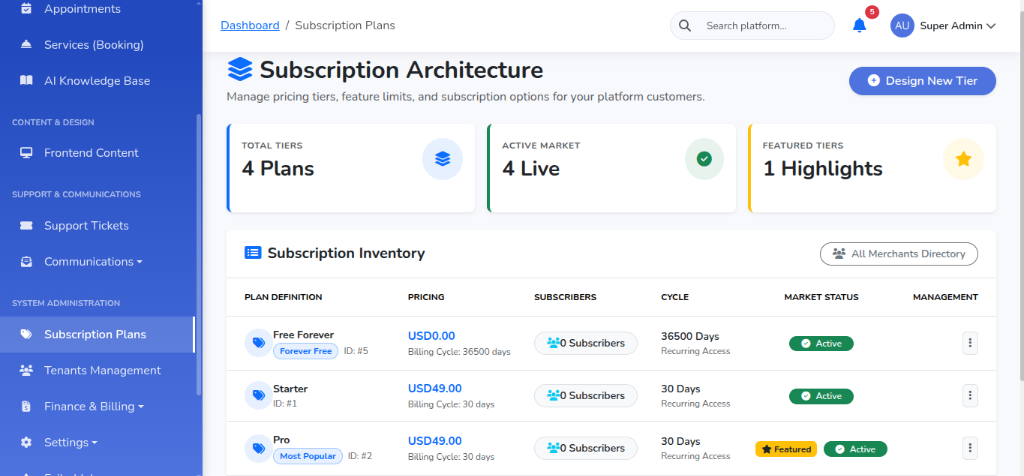
- Trial Days: Set default free trial durations for new business registrations.
- Manual Offline Payment Approval: Review and approve offline bank wire receipts submitted by tenants for plan upgrades.
- Custom Pricing & Currencies: Define plan pricing in your preferred site currency.
Coupon & Promo Code Discount Engine
Super Admins can launch marketing campaigns and incentivize plan upgrades using the built-in Coupon Code system:
Coupon Codes Management
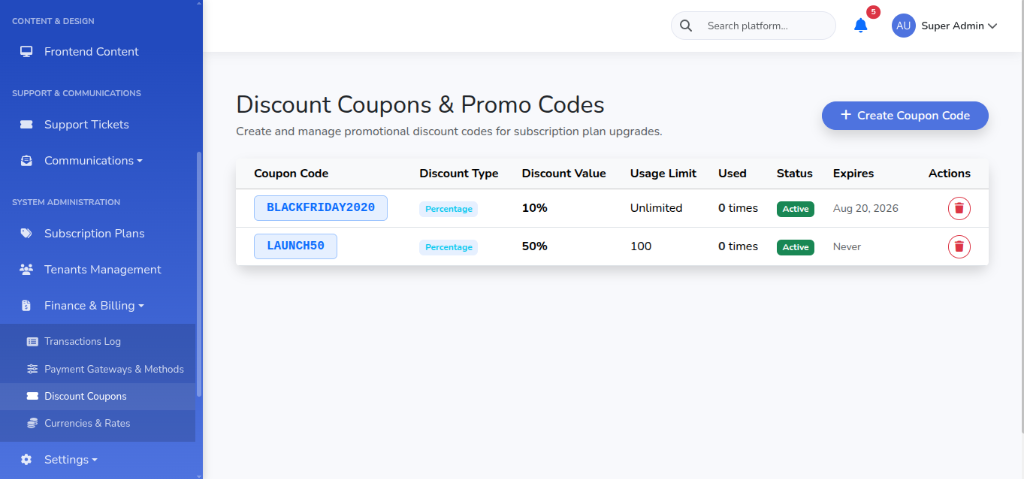
- Discount Types: Support for both Percentage discounts (e.g. 20% OFF) and Fixed Amount discounts (e.g. $50 OFF).
- Usage & Expiration Rules: Set max usage limits per coupon code and expiration dates for promo campaigns.
17+ Global Payment Gateways Engine
WAPIdesk features the most comprehensive payment gateway suite on CodeCanyon, allowing admins and tenants to collect payments globally:
Automated Card & Digital Gateways
Stripe, PayPal, Paystack (Africa), Flutterwave (Africa), Razorpay (India), Cashfree (India), Paytm (India), Alipay (China), China UnionPay, and RiskPay.
Crypto & Bitcoin Lightning Gateways
NOWPayments, CoinPayments, Coinbase Commerce, CoinOS (Bitcoin & Lightning), Cryptomus, Blockchain.com, and BTCPay Server.
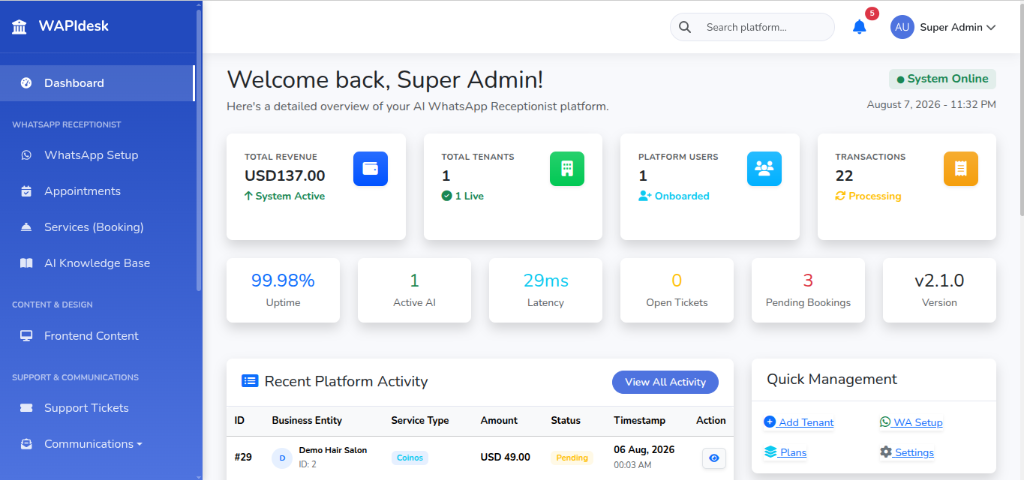
Super Admin Command Center
The Super Admin Dashboard provides a bird's-eye view of your SaaS platform health, subscriber metrics, subscription revenue, and system activity:
Super Admin Command Center
Tenant Public Landing Page & Storefront Profile
Every tenant on WAPIdesk gets a dedicated, SEO-optimized public landing page (`/b/your-business-slug`):
Tenant Public Storefront Profile
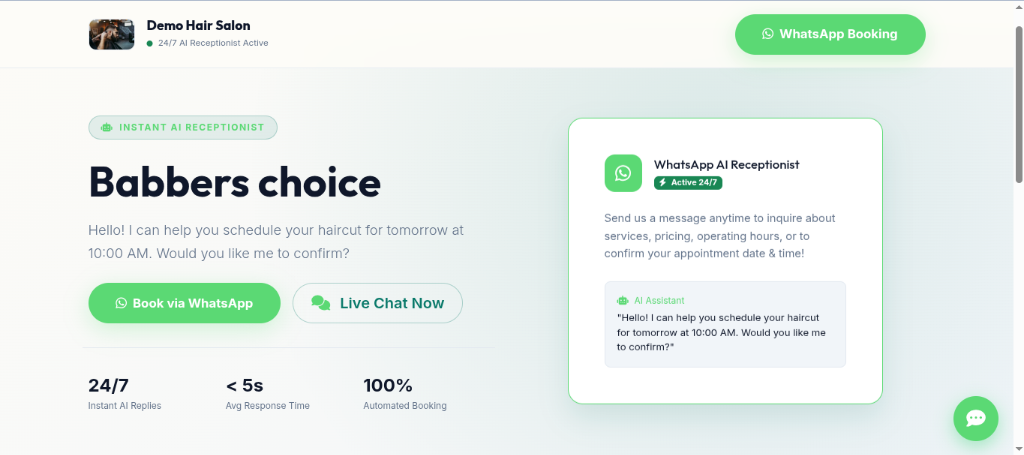
- Direct Booking & Inquiry: Customers can book appointments or initiate WhatsApp chats directly from the business storefront page.
- Service & Catalog Showcase: Displays active services, prices, durations, and product images.
- Custom Branding: Shows tenant logo, business description, working hours, and social media links.
Meta & UltraMsg WhatsApp Gateways
WAPIdesk gives tenants the flexibility to choose between two powerful WhatsApp integration options:
WhatsApp Integration Setup Dashboard
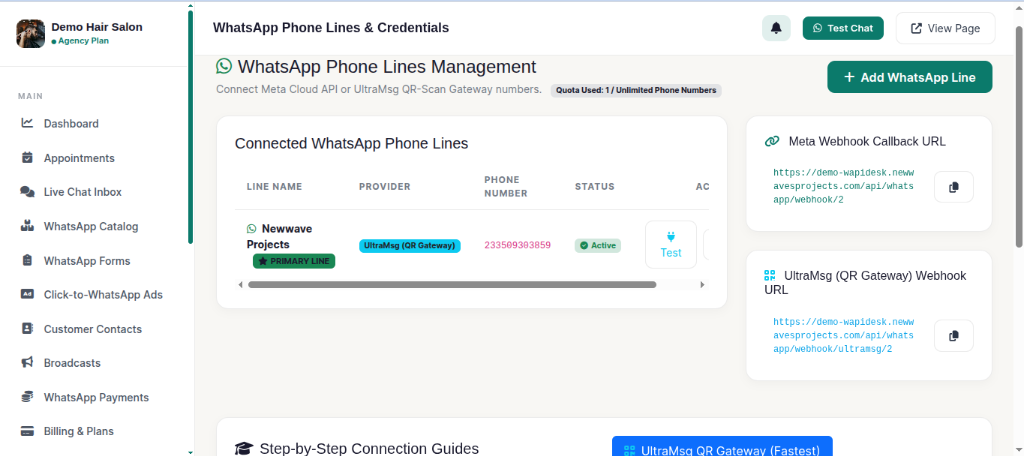
Meta Official Cloud API
Direct official integration with Meta Developer Platform. Requires WhatsApp Phone Number ID and Permanent Access Token. Offers maximum reliability and official Meta verification.
UltraMsg QR-Gateway
Connect any personal or business WhatsApp number in seconds by scanning a QR Code. Requires Instance ID and Token.
Multi-LLM AI Engine
Tenants can connect their preferred AI provider or rely on global platform settings configured by the Super Admin:
- OpenAI: Supports
gpt-4o,gpt-4o-mini, andgpt-3.5-turbowith native JSON tool calling for appointments and payment link generation. - Google Gemini: Supports
gemini-1.5-proandgemini-1.5-flash. - Groq LLM: Supports high-speed
llama3-70b-8192inference.
Knowledge Base & RAG Document Training
Train your AI Receptionist on your business documents so it can accurately answer customer questions 24/7:
AI Knowledge Base Management
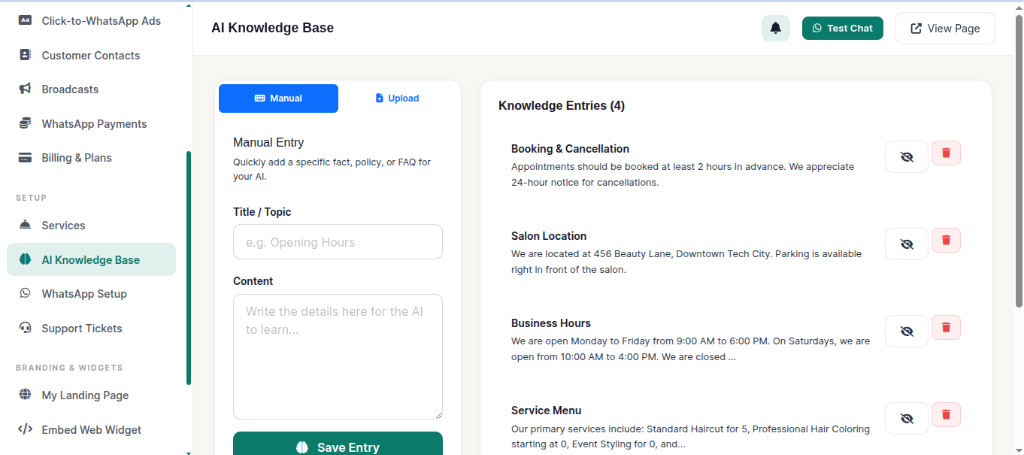
- Document Formats Supported: PDF (
.pdf), Microsoft Word (.docx), and Plain Text (.txt). - Automatic Text Parsing: WAPIdesk automatically extracts full text from uploaded files, chunks the knowledge, and injects relevant context into AI conversations.
- Custom Prompt Instructions: Add explicit business guidelines, rules, and tone-of-voice preferences in Tenant Settings.
WhatsApp Product Catalog Engine
Manage products, pricing, inventory, and automated sales inside WhatsApp chats:
WhatsApp Product Catalog Dashboard
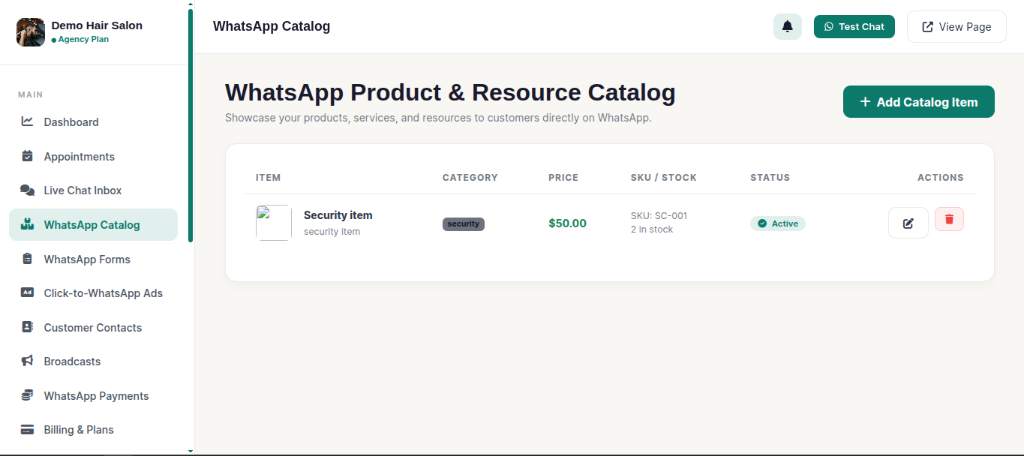
- Inventory & Stock Management: Set items as In-Stock or Out-of-Stock.
- AI Recommendations: The AI Receptionist automatically presents relevant catalog items and product pictures when customers inquire about products.
WhatsApp Forms & Survey Builder Engine
Create dynamic customer intake forms, surveys, and lead qualification sheets:
WhatsApp Forms Management
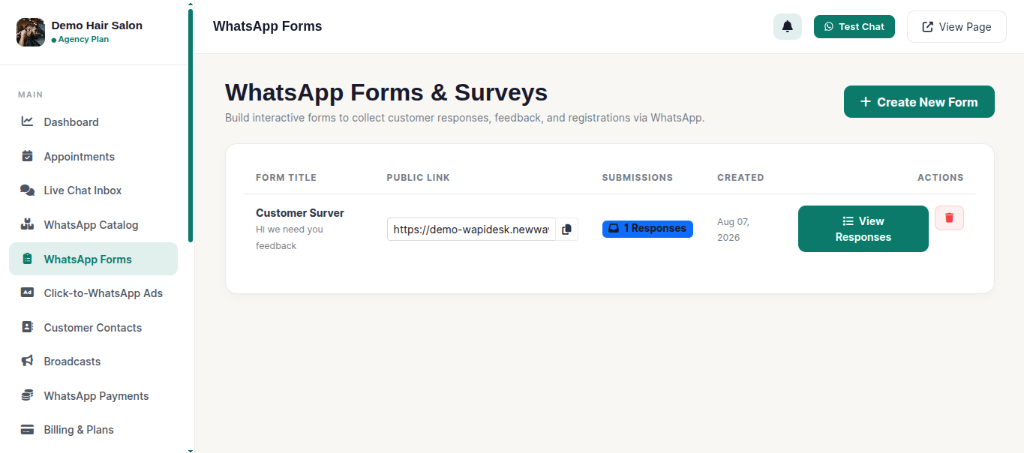
- Public Shareable URLs: Every form gets a clean public URL (`/f/form-slug`).
- AI Auto-Sharing: The AI automatically detects when a client requires an intake form or survey and shares the direct form link cleanly in-chat.
- Submissions Ledger: View and export form response data directly from your dashboard.
AI Appointment Booking & Conflict Engine
WAPIdesk operates as an autonomous receptionist that schedules client appointments directly inside WhatsApp or web chats:
Appointments Management Dashboard
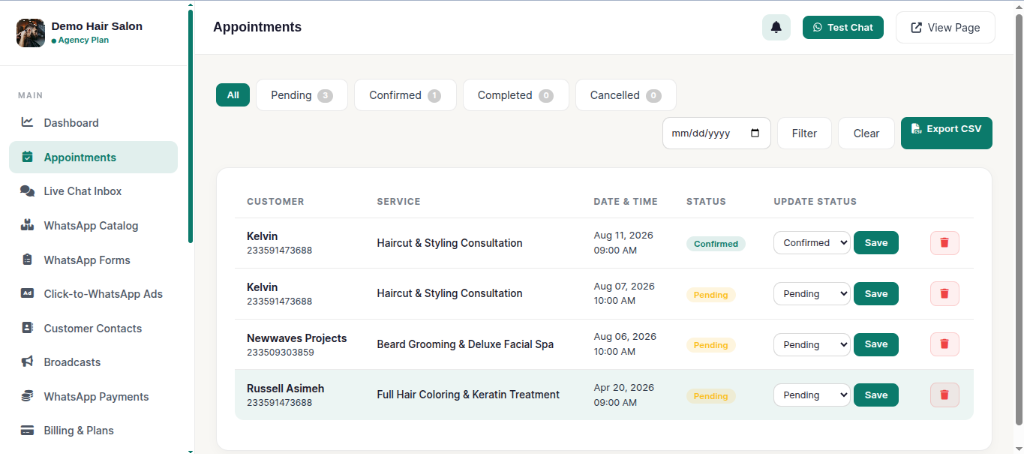
- Real-Time Slot Availability: Prevents double-booking by checking existing appointments for date and time conflicts.
- Reschedule & Cancellation: Customers can modify or cancel existing bookings through natural language conversation.
- Tenant Bell Notifications: Sends immediate notifications to tenant dashboards when a booking is created or updated.
WhatsApp In-Chat Payment Links Engine
Collect payments seamlessly inside WhatsApp chats:
WhatsApp Payments Engine
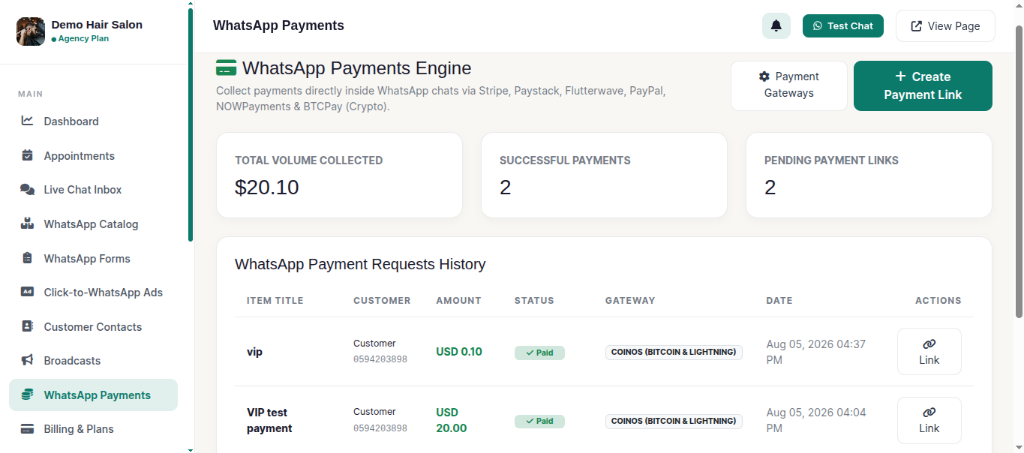
- AI Automated Payments: When a customer asks to purchase a product or service, the AI looks up the price from active Services or Catalog items and generates a secure checkout link.
- Manual Payment Link Generator: Merchants can open WhatsApp Payments $\rightarrow$ Create Payment Link, select any active product/service from a dropdown, and generate instant payment links manually.
Embeddable Web Chat Widget
WAPIdesk includes a lightweight, pure Vanilla JavaScript live chat widget that can be embedded on any website:
Embed Chat Widget Settings
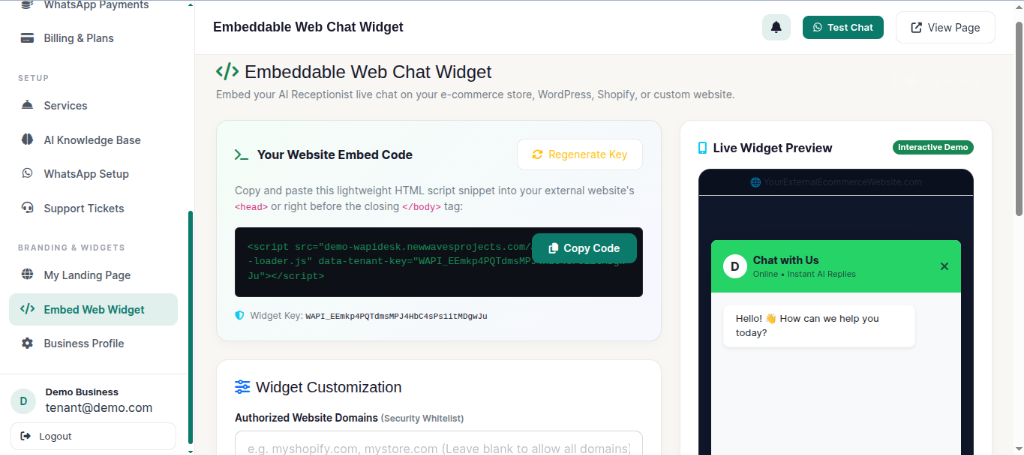
<!-- WAPIdesk Live Chat Widget -->
<script src="https://your-domain.com/assets/js/widget-loader.js" data-tenant-key="YOUR_TENANT_WIDGET_KEY" async></script>
Click-to-WhatsApp Ad Campaigns
Drive leads from social media directly into automated WhatsApp conversations:
Click-to-WhatsApp Ads Dashboard
Mass WhatsApp Broadcast Campaigns
Reach customer subscriber lists with targeted WhatsApp broadcasts:
Mass WhatsApp Broadcast Dashboard
Live Chat Inbox & Real-Time Human Override
Human support agents can take over conversations at any time:
Live Chat Inbox & Agent Override
Multi-Theme Engine (3 Curated Themes)
WAPIdesk features 3 hand-crafted dashboard themes:
Dark Emerald (Default)
Sleek dark mode with vibrant emerald green accents.
Light Ivory
Clean, executive warm ivory theme for light-mode lovers.
Midnight Purple
Deep futuristic purple gradient theme.
Frequently Asked Questions (FAQs)
Q: Can WAPIdesk run on standard cPanel shared hosting?
Yes! WAPIdesk is optimized for shared hosting environments running PHP 8.2+ and MySQL 8.0+/MariaDB.
Q: Do tenants need their own OpenAI / Gemini API keys?
Tenants can either enter their own custom API keys in Tenant Settings, or use the global platform AI key configured by the Super Admin in Admin Settings.
Q: How does the live chat human takeover work?
When a tenant agent clicks "Take Over Chat" in the Live Chat Inbox, WAPIdesk pauses the AI Receptionist for that customer. Human agent replies are sent directly to the customer's WhatsApp or web chat.
Contact Support
If you have any questions, encounter issues during installation, or need custom assistance, please feel free to reach out to our dedicated support team:
Response Time: Within 24-48 hours (Monday to Friday).